No PROCESSORS
all who accedeis to this blog, I apologize for taking and a few days without posting anything, for lack of time, I am quite busy lately with lots of little things, 24 hours a day, I fall short, it is temporary, I hope to return soon to normal and continue to make entries, this has not been done here:)!
Greetings to all;)
Tuesday, October 23, 2007
Friday, October 12, 2007
9 Month Old Has Chesty Cough
Here I leave these 2 tables of processors ordered from highest to lowest power, may in some cases (especially AMD) the order does not conform exactly to the actual performance, but serious complicated because there would be more appropriate to test each one in a very similar hardware and others ... but I have an idea that meets the general expectations.
As you'll see in the tables the issue of MHz or GHz as important today once relegated to the background not so important, so to see if a processor is more or less powerful it is best to be clear that line belongs and that other models are in that range.
Explain that the core issue of name is due to improvements or differences with other models, improvements to the type of technology under microns or less consumption of W, likewise some cores are better finished and easier to make a higher overclock. The name of the kernel is the code name for a generation of processors, the name under which internally treat AMD or Intel, is for users of the street demanding to know exactly "all" the electrical specifications of a processor concrete.
*=> means that we can find several models of core: Newcastle, Clawhummer, Winchester, Venice, San Diego and Toledo
* 1 => Manchester or Toledo
* 2 => San Diego Clawhummer or
Once observed
tables should not jump to conclusions such as saying that Intel are better because they generally have more cache or more memorable MHz, the main things is how a processor is designed and the overall performance it gives. I do not go into the Intel-AMD eternal war, try to view this topic neutrality is best exploited as one of her and see objectively. Speaking
power and ranges of processors today, I have come to these conclusions:
In the low-end Athlon 64 is the most powerful processor for less price, mid-range price / performance are the Athlon X2's that are going to be better , and power are the Core 2 Duo winners today, which is easier to make a good choice of processor for each case.
time ago this was more complicated because Intel and AMD processors, in general the whole range of them, were quite even. It must be said that some processors high-end Athlon X2 processors exceed power Core 2 Duo low-end but for this I think the right thing is to select the most powerful processor can about money we want to spend that after all is what will determine which processor we acquire.
After days and days of sailing aimlessly through the internet and read many reviews both "experts" and users have come to the conclusion I said before, regarding the recommended processor low-end, medium and high. What is quite sad from my point of view is to see how often call Intel and AMD fanboys are "insulting" including defending "his mark", which is absurd because I think we should have a little more open mind and if Intel today is that you have more powerful processors before AMD was the departure of its Athon64 and tomorrow no one knows ... is preferable each time selecting the most powerful within the capabilities of each other regardless of the brand that makes.
This other table the price I got PC-BOX after looking at the prices of many other web stores and these have seen a fairly complete table is only something close to that you see as you choose according to the NEED IT budget that (some processors that are already outdated in the market will see that not go because the price is higher than other more powerful today, such is the case of the E6300 and E6600 have been replaced by the 6550 and 6750 price / quality / power)
Sunday, October 7, 2007
Who Is Mistirio South Park
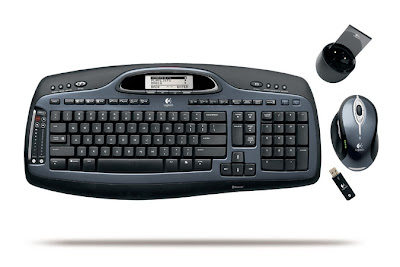
time KEYBOARD and MOUSE
are the input devices, for those who enter commands or select the task you want the computer to perform.
can find on the market either individually or together in a kit.
The keyboards itself are all virtually identical in their functionality, some difference to have multimedia buttons, but in general are all very similar, except those used for laptop (and also the ultra-fine for normal PC) to to be much finer uses a form of X less robust than a standard keyboard for your desktop computer.
In the case of mice we find significant differences the user of each other, so that we could differentiate according to these models: Ball
: are the first design today can be found with PS / 2 or USB, and incorporating a wheel slip, the method operation is that a ball placed under the mouse turns the X and Y and the computer translates it to make the cursor move across the screen, said ball needs to be cleaned of dust and dirt so that the movement is optimal. TrackBall
: similar to above but the ball (usually larger), is of a different material and placed in the top, so that the user moves the mouse but only moves the ball, this mouse is underway, and is where is effective for users who design or work with CAD programs, allowing them to operate more easily and quickly. Optical
: they differ from above by the absence of the ball, if it works differently. It consists of an optical sensor that records every movement of the sliding on the screen. The advantage of these mice, plus it is no longer necessary maintenance of the ball, is that the movement is much more accurate and consistent. Not all optical mice are the same quality as the operation of an optical mouse is similar to a digital camera ie, the mouse is like to photograph the surface on which it moves, it is noteworthy that there are optical mice different resolutions measured in pixels per inch (dpi), so the higher this measure will be necessary and progressive mouse movement. Another thing to keep in mind about optical mice is that due to its operation based on reflection of light is not able to move on glass surfaces, nor is it able to move freely in my dark or black surfaces and white surfaces, so even if they do not need a mat and ball mice to move freely, whether it is advisable to avoid slipping nonprogressive a specific use for them if we notice the movement in the area for which it is not right move. Laser
: a new technology, changes in the optical, but more expensive laser sensor which is faster and more accurate. Something important to take into account the way it works is that the laser does not emit visible light, ie to turn the mouse does not see a beam of red light in optical mice.
addition to differences in performance technology, another of the differences of mice with others is that they are wired or wireless incorporated within the wireless found these 2: RF
: the keyboard and / or mouse transmit data via radio frequency to a receiver connected to the computer by PS / 2 or USB. Every day lowest price, but with the drawback that the distance that can be placed is small (about 2mm at most, which in many cases do not reach) and the possible interference that may affect their operation.
This is important the quality and / or brand of the group in question, as there are in the market sets a very low cost wireless which can be quite problematic and easily lost in the same frequency so that the receiving / shipping usually has a greater delay in other higher-end models (Trust, Labtec and Rainbow are eg some of the fairly widespread brands whose qualities are usually low-end and Logitech and Microsoft are usually sets of higher quality and less problematic)
Bluetooth: This technology is newer, so it is normal that keyboard are implementing high-end and higher price than other models, but it will be the standard here at once, thanks to its versatility. In this case the keyboard and / or mouse transmits data to a Bluetooth device that can be plugged into the computer in many ways and can order to deceive the signals of more Bluetooth devices at a higher speed than radio, with less possibility interference and greater range (between 10 and 100 meters in open plan, depending on the Bluetooth technology).
Subscribe to:
Posts (Atom)